Joined: Feb 16, 2009
Posts: 1439
Location: Halifax, Nova Scotia, Canada
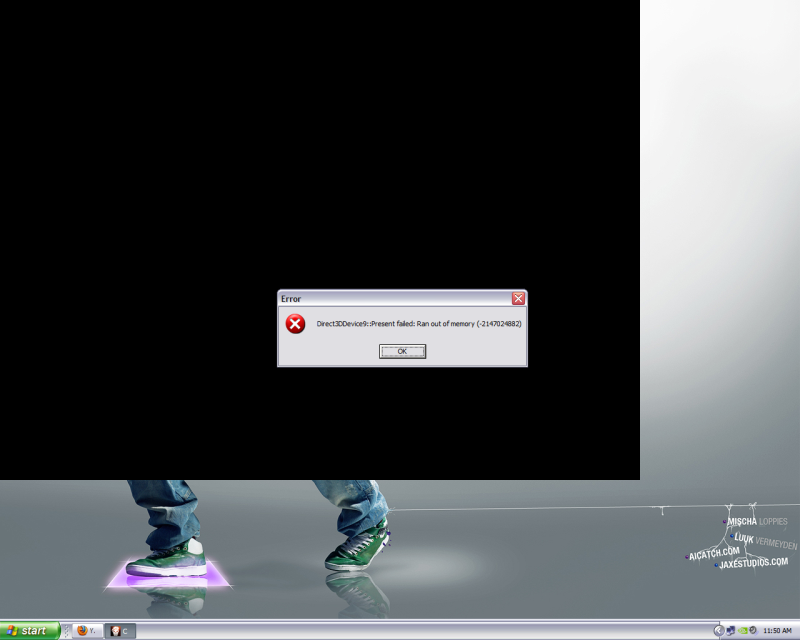
I'm just wondering how many of you are experiencing this problem, I know a couple people were, we would be playing fine, then the next map comes, it loads, and within 30 seconds, just after I pick my loadout, the game freezes and i'll have to ctrl alt delete out and end the process...


Joined: Mar 24, 2009
Posts: 2013
Location: Washington
Not quite like that but I get kicked a minimum of once every fifteen minutes. And that is usually after five minutes trying to connect in the first place.
Joined: Nov 12, 2010
Posts: 4
That has happened to me once or twice, but it doesn't do it very often for me
Joined: Jul 26, 2007
Posts: 9918
Location: Grand Rapids, MI
Strand I hear restarting your computer after the patch may help. Give it a try and let us know.
GOA.Luke*BK*

Joined: Feb 16, 2009
Posts: 1439
Location: Halifax, Nova Scotia, Canada
Strand I hear restarting your computer after the patch may help. Give it a try and let us know.
GOA.Luke*BK*
I have tried almost every fix possible, updating drivers, updating direct x, changing my desktop resolution to 1024x748 and nothing works

Joined: Sep 19, 2008
Posts: 18
Yeah, same problem here Strand. Maybe VA got bad copies of the game....
Joined: Feb 16, 2009
Posts: 1439
Location: Halifax, Nova Scotia, Canada
Joined: Mar 24, 2009
Posts: 2013
Location: Washington
Today I am getting that every 10 minutes or so when the entire time since launch I only had it happen twice.
Joined: Feb 16, 2009
Posts: 1439
Location: Halifax, Nova Scotia, Canada
It seems to happy pretty frequently when there is a high volume of players playing the game, around peak hours 4-9 pm est, during this time period iim lucky to get in two full maps but during the other times it might happen once every couple hours, so I think it is hardly a problem with my computer since I run everything max without a hitch (when I say max, I mean 1280x1024, since that's all my monitor supports), and has everything to do with Treyarch's support with Windows XP and Nvidia, hoepfully by the end of the weekend, ill have windows 7 anyways.
Joined: Aug 11, 2009
Posts: 2530
Joined: Feb 16, 2009
Posts: 1439
Location: Halifax, Nova Scotia, Canada
yea, theres supposed to be a new patch that might help the black screen crash thats related to DX9, also some nvidia issues and the kill cam choppyness among others by the end of the weekend, its in QA now.
Joined: Mar 24, 2009
Posts: 2013
Location: Washington
Hopefully it fixes a few things.
Joined: Mar 09, 2009
Posts: 14
I'm sure you guys have checked already, and since I have not experienced the symptoms you all are having:
* Check to see punkbuster is updated.
* Obviously make sure you have latest Vid drivers.
* I find, that I have to once my system has been booted up, to immediately reboot. Somehow this fixes my card from crashing within a few mins of play.
* Also, see if your security software does not conflict with punkbuster and/or put it in "game mode".
Joined: Mar 24, 2009
Posts: 2013
Location: Washington
Black ops uses vac, not punkbuster.
I am sure we all have up to date drivers.
Tried disabling av temporarily and even switched products to no avail.
Basically it is a new problem popping up every day for people at random times.
Joined: Mar 24, 2009
Posts: 2013
Location: Washington
Black ops uses vac, not punkbuster.
I am sure we all have up to date drivers.
Tried disabling av temporarily and even switched products to no avail.
Basically it is a new problem popping up every day for people at random times.