Joined: Jan 09, 2010
Posts: 502
Location: Connecticut
Posted: Thu Sep 28, 2017 3:28 pm
So apparently Photo-bucket no longer allows for pasting images into forum web sites anymore. Maybe we can look at a fix on the forums to allow us to upload from our PC going forward. But for now this might help you.
I found using Microsoft Edge (Windows 10 users) This browser didn't work too well. Missing key aspects on the web page. I used Firefox and I'm sure Chrome will work without any issues.
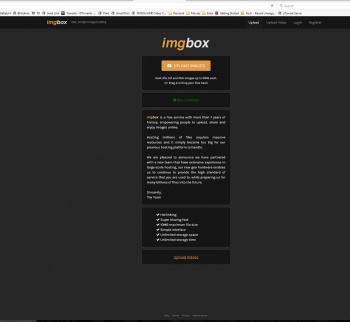
I tried Img Box on this whole post and was very successful. You don't even have to create an account (from testing I didn't) Once you find the image you want to upload it. If you click on any of these images to get a better view, you will be taken to the imgbox web site to view it. You don't have to log in or anything.
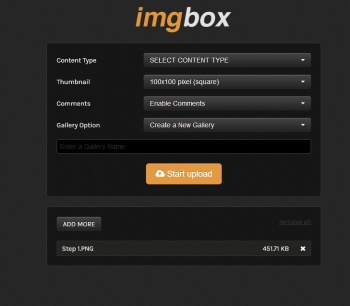
1. Content Type: I Chose Family
2. Thumbnail: I chose 350 x 350 (Resized) I did not test the other ones out. Perhaps someone else can and post the results?
3. I left everything else alone.
4. Name your picture
5. Start Upload
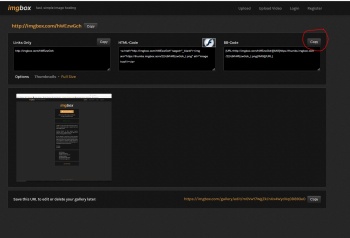
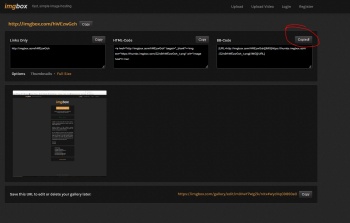
6. When finished click on the BB-Code (Make sure you see the word COPIED! when done.
7. Go back to the forums and Paste it in the body of the text (forum box)
8 (In Forums) Click on Preview if you want to see you did it right.

If you can't take the pain, maybe you shouldn't play!
I found using Microsoft Edge (Windows 10 users) This browser didn't work too well. Missing key aspects on the web page. I used Firefox and I'm sure Chrome will work without any issues.
I tried Img Box on this whole post and was very successful. You don't even have to create an account (from testing I didn't) Once you find the image you want to upload it. If you click on any of these images to get a better view, you will be taken to the imgbox web site to view it. You don't have to log in or anything.
1. Content Type: I Chose Family
2. Thumbnail: I chose 350 x 350 (Resized) I did not test the other ones out. Perhaps someone else can and post the results?
3. I left everything else alone.
4. Name your picture
5. Start Upload
6. When finished click on the BB-Code (Make sure you see the word COPIED! when done.
7. Go back to the forums and Paste it in the body of the text (forum box)
8 (In Forums) Click on Preview if you want to see you did it right.
If you can't take the pain, maybe you shouldn't play!